Fine-tuning SDK Tutorial
1. Overview
HPC-AI Fine-tuning SDK is designed to provide developers with a flexible and efficient large-model fine-tuning experience. The SDK is built on top of the open-source Tinker project (Apache License 2.0) by Thinking Machines Lab. We appreciate the contributions from the open-source community and have further customized the project to deeply integrate with HPC-AI's high-performance computing infrastructure.
By offloading heavy computation to the cloud HPC cluster, the SDK enables smooth local development while delivering highly efficient fine-tuning performance.
Key Advantages
- Local Logic, Cloud Execution: Write your training loop and data-processing logic locally, while gradient computation and parameter updates run efficiently on remote servers.
- Fine-grained Control: Supports atomic operations such as forward, backward, and optim_step — giving you PyTorch-like control over your workflow.
- Ready to Use: Built-in support for mainstream models (e.g., Qwen series) and LoRA fine-tuning.
Note: We currently focus on supervised fine-tuning (SFT). Reinforcement learning (RL)-related functions such as
samplewill be supported in future releases.
2. Preparation
Before getting started, ensure your environment and authentication are properly configured.
2.1 Obtain an API Key
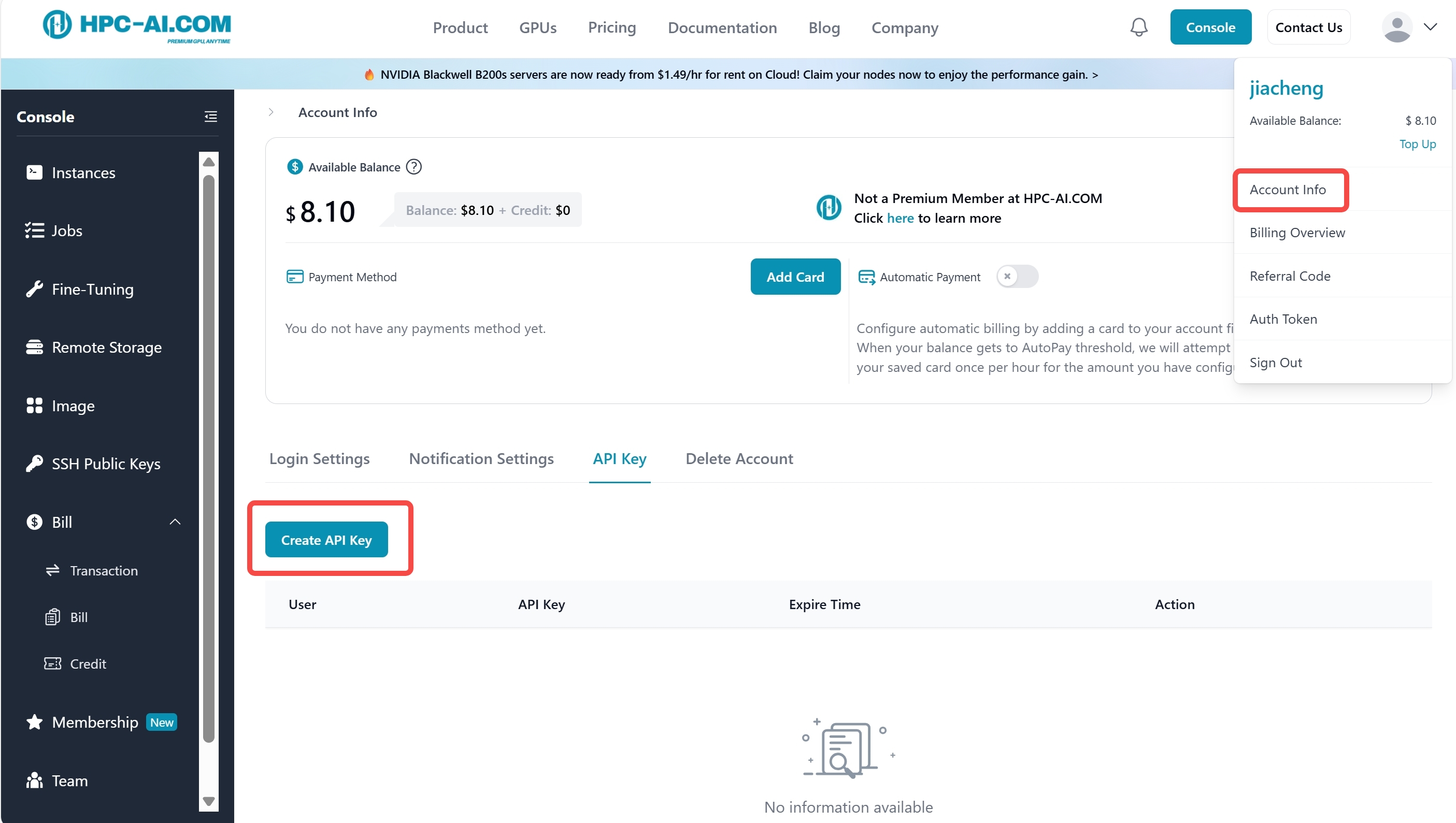
To establish a secure connection to our HPC-AI cluster, you must create your personal API Key:
-
Log in to the HPC-AI.COM Console.
-
Click the profile avatar in the top-right corner to enter Account Info.
-
Open the API Keys tab and click Create API Key.
- Keep your API Key secure and never expose it in public repositories.
2.2 Install the SDK
Install the SDK and its utilities via source or pip:
# Clone the repository and install
git clone https://github.com/hpcaitech/HPC-AI-SDK
# Local install
pip install -e .
3. Quick Start: Build Your First Fine-tuning Task
This tutorial demonstrates how to use the HPC-AI Cloud Fine-tuning SDK to perform supervised fine-tuning (SFT) on the Qwen3-8B model with LoRA.
Step 1: Initialize the Client
Configure the connection endpoint and initialize the service client.
Note:
- Base URL is public and used to locate HPC-AI Cloud services.
- API Key is private — each user has an individual key used for authentication.
import time
import hpcai
from hpcai import types
import wandb
from pathlib import Path
import datasets
from datasets import concatenate_datasets
from hpcai.cookbook import renderers
from hpcai.cookbook.data import conversation_to_datum
from hpcai import checkpoint_utils

BASE_URL = "https://www.hpc-ai.com/finetunesdk"
API_KEY = "Your_API_Key_Here"

# Initialize the service client
service_client = hpcai.ServiceClient(base_url=BASE_URL, api_key=API_KEY)
Step 2: Create a Training Instance
Define the model configuration and create a remote training session. HPC-AI.COM supports enabling LoRA fine-tuning through a simple configuration.
MODEL_NAME = 'Qwen/Qwen3-8B'
LORA_RANK = 32

# Create the LoRA training client and initialize model resources in the cloud
training_client = service_client.create_lora_training_client(
    base_model=MODEL_NAME,
    rank=LORA_RANK,
)

print(f"Training session started with Model ID: {training_client.model_id}")
Step 3: Data Preparation
Use the SDK’s tokenizer to preprocess your dataset. This example uses the “Knights and Knaves” dataset.
import datasets
from datasets import concatenate_datasets
from hpcai.cookbook import renderers
from hpcai.cookbook.data import conversation_to_datum

# Acquire tokenizer from the remote model
tokenizer = training_client.get_tokenizer()

# Load and preprocess dataset
dataset = datasets.load_dataset("K-and-K/knights-and-knaves", "train")
dataset = concatenate_datasets([dataset[k] for k in dataset.keys()]).shuffle(seed=42)

# Format messages
dataset = dataset.map(
    lambda example: {"messages": [
        {"role": "user", "content": example["quiz"]},
        {"role": "assistant", "content": example["solution_text"]},
    ]}
)
Step 4: Execute the Training Loop
This is the core highlight of the SDK.
Using forward_backward and optim_step, you fully control each step of the cloud-executed training pipeline.
import time
import wandb
from hpcai import checkpoint_utils

# Hyperparameters
BATCH_SIZE = 32
LEARNING_RATE = 1e-4
MAX_LENGTH = 1024
TRAIN_STEPS = 30
SAVE_EVERY = 30
LOG_PATH = "./tmp/tinker-examples/sl-loop"

# Initialize WandB (optional)
wandb.init(project='qwen-3-8B-sft-demo')

target_steps = min(len(dataset) // BATCH_SIZE, TRAIN_STEPS)
renderer = renderers.get_renderer("role_colon", tokenizer)

print("Starting training loop...")

for step in range(target_steps):
    start_time = time.time()

    # 1. Save checkpoints
    if step > 0 and step % SAVE_EVERY == 0:
        paths = await checkpoint_utils.save_checkpoint_async(
            training_client, name=f"step_{step}", log_path=LOG_PATH,
            loop_state={"step": step}, kind="both"
        )
        print(f"Checkpoint saved: {paths}")

    # 2. Prepare batch data
    batch_start = step * BATCH_SIZE
    batch_rows = dataset.select(range(batch_start, batch_start + BATCH_SIZE))
    batch = [
        conversation_to_datum(
            row["messages"], renderer, MAX_LENGTH,
            renderers.TrainOnWhat.ALL_ASSISTANT_MESSAGES
        ) for row in batch_rows
    ]

    # 3. Forward + Backward (executed remotely)
    fwd_bwd = training_client.forward_backward(batch, loss_fn="cross_entropy")

    # 4. Optimizer step with LR scheduling
    lr = LEARNING_RATE * (1.0 - step / target_steps)
    optim = training_client.optim_step(types.AdamParams(learning_rate=lr))

    # 5. Retrieve metrics
    result = fwd_bwd.result()
    loss = result.metrics.get("loss:mean", 0.0)

    elapsed = time.time() - start_time
    print(f"Step {step + 1}/{target_steps} | Loss: {loss:.4f} | LR: {lr:.2e} | Time: {elapsed:.2f}s")

    wandb.log({'train_loss': loss}, step=step+1)
Step 5: Release Resources
After training, free the cloud GPU resources:
training_client.unload_model().result()
print("Model unloaded successfully.")
4. Need More Help?
- Visit our complete API Reference, which includes:
- Explore more examples in our GitHub repository